Note
Edit(29, Jan, 2025): Bun introduced text-based lockfile which is readable on Neovim.
Bun is a really nice JavaScript tool! I really love it.
One of the coolest things in Bun is the aspect of package manager. bun install is extremely fast. Bun uses a unique lockfile called Bun.lockb. This is similar to package-lock.json in npm. This binary lockfile speeds up the installation process.
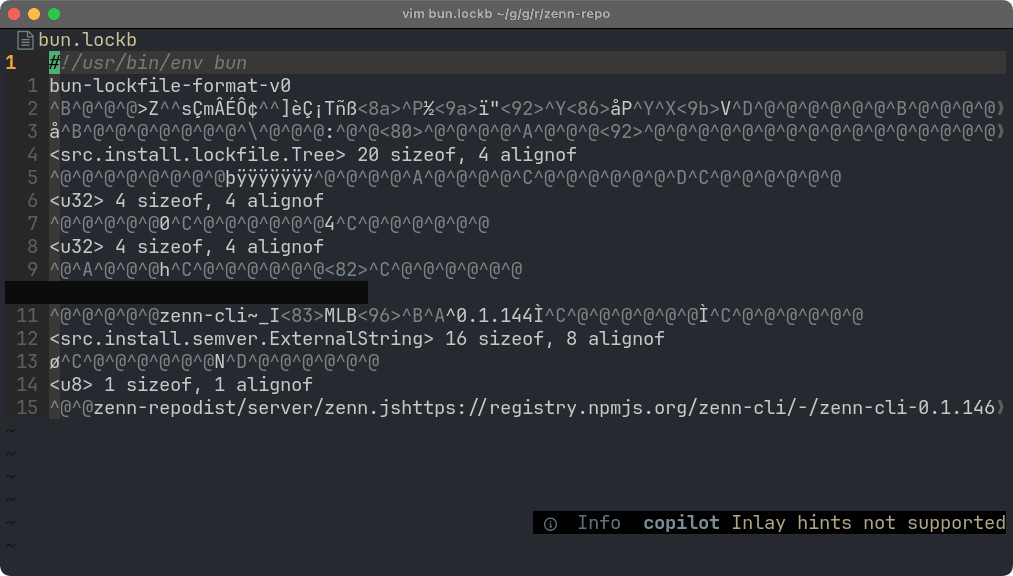
However, due to its binary format, you cannot view the content of Bun.lockb directly.
This is somewhat inconvenient.
For VSCode Users
You can simply install the official extension and it works.
For Vim/Neovim Users
There is no official plugin for Vim/Neovim. Let's make it by ourselves!
In fact, bun has outputs Bun.lock in yarn v1 format by:
bun bun.lockbSo, we can utilise this feature!
Let's write a simple vim plugin that automatically runs bun bun.lockb when you open a Bun.lockb file.
Lua Version
If you are using Neovim, you can write in Lua:
vim.api.nvim_create_autocmd("BufReadCmd", {
    pattern = "bun.lockb",
    callback = function(ev)
        -- get the absolute path of the current file
        local path = vim.fn.expand("%:p")
        -- run command 'bun ' .. path and get stdout
        local output = vim.fn.systemlist("bun " .. path)
        -- set output to current buffer
        vim.api.nvim_buf_set_lines(0, 0, -1, true, output)
        -- set filetype to yarn.lock
        vim.opt_local.filetype = "conf"
        -- set readonly
        vim.opt_local.readonly = true
        -- set nomodifiable
        vim.opt_local.modifiable = false
    end,
})
Vim Script Version
Also, Vim Script is great because both Vim and Neovim can use it!
augroup BunLockb
    autocmd!
    autocmd BufReadCmd bun.lockb
        \ let path = expand("%:p") |
        \ let output = systemlist("bun " . path) |
        \ call setline(1, output) |
        \ setlocal filetype=conf |
        \ setlocal readonly |
        \ setlocal nomodifiable
augroup END
I've made a plugin based on this article, so you can just install it in your way!
Enjoy!