TL;DR
The most efficient LLM-friendly documentation delivery method is to download it locally
Library authors should consider publishing documentation with their
npmpackages (e.g.,@foo/docs)In today's era of vibe coding, making libraries and frameworks LLM-friendly is crucial
Note: This blog focuses primarily on the JavaScript ecosystem, so I'm discussing publishing to the
npmregistry. For other ecosystems, consider the equivalent package distribution mechanisms.
2025: The Year of Coding Agents and MCP
2025 has been the year of Coding Agents. Claude Code was announced in March and went GA in May, maintaining incredible momentum. This sparked interest in other agents like Codex and OpenCode. Looking around, discussions about which models are best for coding, which agents produce the best output, and which tools support code generation have dominated the conversation. Additionally, MCP adoption has grown significantly. It's considered particularly effective for assisting Coding Agents, with new MCP Servers being released daily.
Getting Desired Output from LLMs
There are countless development tools and libraries in the world. LLMs primarily learn from popular ones and naturally cannot know anything after their knowledge cutoff, so you won't get desired output without providing additional context. This is particularly evident with web frontend frameworks that have undergone breaking changes, such as Svelte 4 to 5, or React Router V6 to V7. Furthermore, libraries for building CLI tools tend to be more obscure with less training data, often resulting in suboptimal output. To solve these problems, setting up an environment that provides as much information as possible to LLMs becomes crucial. In other words, guiding the LLM to produce desired output by preparing and making accessible knowledge that isn't in its training data. Throughout the past year, various discussions have taken place across different venues. Some approaches were considered good at the time, others not so much in retrospect.
The Bottom Line
In today's era of vibe coding, making libraries and frameworks LLM-friendly is becoming increasingly important. Libraries that don't work well with LLMs risk being overlooked entirely. So how can library authors achieve an LLM-friendly environment?
To put it simply, the most efficient LLM-friendly documentation delivery method currently is downloading documentation locally and letting Coding Agents read it freely.
I believe the most effective approach for library authors is to upload documentation to registries like npm in a version-controlled manner.
This blog discusses how documentation delivery methods have evolved and why I've concluded this approach is best.
Evolution of Documentation Delivery Methods
RAG
RAG (Retrieval-Augmented Generation) is widely known as a method for providing external knowledge to LLMs. After ChatGPT was released in November 2022, people recognised that "passing relevant information along with prompts yields knowledge-based desired output". This sparked discussions about how to extract and pass relevant information from prompts. I won't go into specific RAG techniques here, but the importance of passing documentation for one-shot answers became a prominent topic from this point.
Web Search
In 2023, web search functionality was added to ChatGPT. This enabled LLMs to access the latest information on the internet. ChatGPT could now actively search for information online and generate responses about it. However, HTML structure isn't LLM-friendly, and searching every time is costly, making this far from an efficient method. Coding Agents typically include web search functionality, but this problem will continue to persist. Considering the current wisdom of Context Engineering, web search should be a last resort.
llms.txt
llms.txt is a relatively new proposed web standard from September 2024.
With llms.txt, websites can abandon human-oriented structures like HTML and describe minimal necessary information in markdown for LLMs, reducing token count whilst providing accurate information.
Documentation services like Mintlify are increasingly returning llms.txt automatically instead of HTML when accessed by Coding Agents.
MCP Server
From late 2024 into 2025, MCP (Model Context Protocol) became widespread.
MCP was proposed as a standardisation of the function calling (tool calling) concept announced by OpenAI in June 2023.
In 2025, heavily promoted by Anthropic as a means to provide information to Coding Agents, MCP Servers proliferated rapidly.
The beauty of MCP Servers is that once you define tools following the MCP specification, they work with any Coding Agent you prefer—Claude Code, Codex, OpenCode, or amp code.
Various types of MCP Servers have been created. I also created an MCP Server called sitemcp, proposing a method to provide documentation via MCP Server.
Library and framework authors have begun providing individual MCP Servers for their tools.
There are also MCP Servers that use proprietary methods to nicely summarise and return GitHub and library information. Deepwiki MCP, Context 7, and grep mcp are prime examples.
Problems with Existing Methods
However, MCP Servers have significant problems:
There's a limit to how many MCP Servers you can register with Coding Agents. This limit becomes a major bottleneck when you want to leverage various information sources for coding.
Registering many MCP Servers significantly consumes the context window with their definitions alone, reducing the amount of work achievable per session. Though tangential to this blog's topic, connecting Playwright MCP to Claude Code can consume most of the context window, leaving little room for actual work.
There's a limit to how much information an MCP Server can return at once, and returning substantial information requires multiple exchanges, easily causing N+1 problems.
sitemcpintroduced pagination to address this, but this literally exemplifies the N+1 problem.
Problems shared with llms.txt include:
Fetching remote documentation every time takes time and money
Documentation rarely exists per version, causing information mismatch when using older library versions
Coding Agents only use a portion of retrieved information, yet all retrieved information must be held in the context window, making this very inefficient
Regarding the last problem, Claude Code partially addresses this by introducing Subagents. However, other problems remain.
Back to Basics: Local Documentation
Around April 2025 when MCP started becoming widespread, debates about whether MCP or CLI is better frequently arose. Over the past six months, as Coding Agents evolved through several generations, their accuracy in calling CLI tools improved dramatically (in contrast, accuracy for tool calling like MCP hasn't improved much).
Given this, I've been hearing more frequently from those around me that keeping documentation and library source code locally is probably best.
For example, my friend NATSUKIUM writes instructions in CLAUDE.md to use ghq to clone libraries locally for reference. Also, the CLI tool btca provides mechanisms to actually clone specified libraries from GitHub and provide that information.
Once documentation is stored locally, Coding Agents can use tools like fd and rg to find necessary information and read only what they need.
Since there's no need to fetch information from remote sources, this is highly efficient.
Even if documentation exists in a repository, it's usually Markdown. In 2025, the probability of documentation being written in something other than Markdown is quite low.
Publish Your Documentation
It's clear that keeping documentation and code locally is effective. So how can we generalise this approach? How can library authors make their libraries and frameworks LLM-friendly with minimal effort? How do we solve version differences that the above methods don't address?
I propose that library authors bundle documentation with their npm package, or provide a dedicated documentation package like @foo/docs (for the JavaScript ecosystem).
Why npm Packages?
Providing documentation as an npm package has several advantages.
Automatic Local Placement
A key characteristic of npm is that installed packages are placed as actual files in the node_modules directory.
The path is always predictable as ./node_modules/<package-name>, making it easy for Coding Agents to reference.
By publishing documentation as an npm package, simply running npm install automatically places the documentation within your project.
Easy Documentation Reference
Making Coding Agents reference documentation is straightforward:
If you need to implement feature X, use the `@your-library` package.
Please refer to the documentation located at `./node_modules/@your-library/docs/**/*.md` for more information about how to use the library.
You can write this directly in CLAUDE.md or AGENTS.md, or define it as one of your Agent Skills to reference as needed.
Easy Distribution
If you're a library author, you're likely managing documentation and the library itself in a monorepo. In that case, you can publish the documentation repository simultaneously with versioning. Simply copying existing Markdown from your repository and publishing completes the process—it's that easy.
Easy Version Management
By publishing documentation simultaneously with each new package release, users can download matching versions of the library and documentation. Coding Agents can reliably reference documentation corresponding to the library version being used.
Real-World Examples
This method is actually already practised by several libraries.
bun-types
Bun is a JavaScript runtime that provides a bun-types package for type definitions.
This package contains not just Bun's type definitions but also Bun's documentation.
Interestingly, when you generate a project with bun init -y, Bun auto-generates a CLAUDE.md file containing instructions to reference Bun's documentation.
gunshi
gunshi by KAZUPON is a library for building CLI tools in TypeScript. It's currently my favourite CLI library.
This library provides a dedicated documentation package @gunshi/docs separate from the main gunshi package. Like bun-types, Coding Agents can learn how to use gunshi by referencing this documentation.
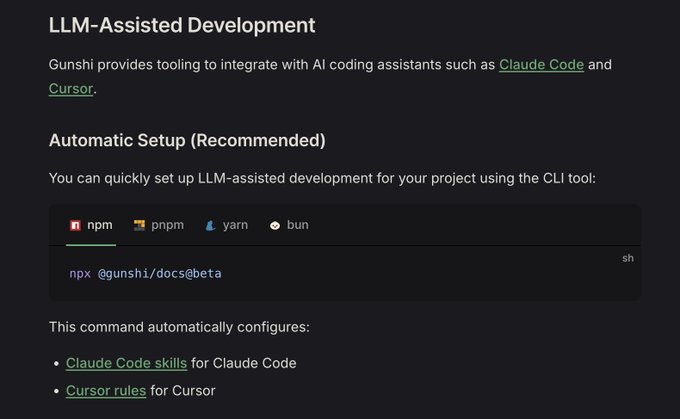
It also provides a mechanism to auto-generate CLAUDE.md or Cursor Rule by running bunx @gunshi/docs.
Comparing using gunshi documentation versus web search only:
Cost: 1.37 USD → 0.44 USD
Implementation time: 3:31 → 0:40
Zero rework needed!
These were the observed effects.
With @gunshi/docs
Web search only
byethrow
byethrow by KARIBASH, another library I use frequently, is a new Result type library that similarly provides a dedicated documentation package @praha/byethrow-docs. byethrow previously provided an MCP server, but the docs package enables faster implementation.
Considerations
There are a few points to consider when adopting this method.
Increased Package Size
Bundling documentation naturally increases package size. However, since Markdown files are text-based, the increase is limited as long as you don't include images. If you provide documentation as a separate package like @foo/docs, the main package size remains unaffected.
Maintenance Cost
When including documentation in a package, you need to update and publish documentation with each release. This cost can be minimised by setting up CI pipelines. If you're managing in a monorepo, keeping documentation and code versions in sync is straightforward.
Conclusion
Over the past year, under the banner of Context Engineering, there's been extensive discussion about how to organise documentation and deliver it to LLMs and Coding Agents.
My current optimal approach is to download documentation locally and trust Coding Agents to freely explore the information.
Publishing documentation to the npm registry may be a good solution to advance this approach.
P.S.

So actually, if I took a benchmark of how effective our Claude code skills for Gunshi are, the result is amazing: With Skills • 0.44 USD • 40s for implementation • 1:05 for implementation + debugging Without Skills • 1.37 USD • 3:31 for implementation • 3:52 for

Gunshi now supports automatic AI assisted development setup for Claude code skills and Cursor Rules at v0.27.0-beta.6 or later. Thanks to @ryoppippi for supporting this feature! 💚